Now that you’ve collected, organized and read some secondary sources on your research topic, it’s time to gather some primary sources as well. As we’ve discussed in class, primary sources are first-hand accounts of a topic. They can come in many shapes and sizes, including artifacts, drawings, photographs, diaries, letters, newspaper articles, speeches and more. For this project, you’ll be gathering primary sources on your research topic and organizing them into Tropy. Like Zotero, Tropy is also a bit like a personal research assistant, but this time with primary sources in mind. It helps researchers manage and describe photographs of research materials. Like Zotero, it helps you remember where you’ve gotten your information from as well. You won’t be going into an archive to take photos, but the process of using Tropy is exactly the same.
If you haven’t already read these Tropy articles for class, make sure you’ve done so before you begin this project:
Both of these articles will set you up for success with this project!
Part 1: Installing Tropy

In order to use Tropy, first you’ll need to install it on your computer.
- Go to Tropy.org to download Tropy.
- Familiarize yourself with how Tropy works by reading the documentation here (“Tropy Basics”) and watching this introductory video. The video is also included in the documentation. Tropy’s documentation is quite detailed, which is helpful for learning how to use the software and for finding solutions should you run into problems.
- Create a Tropy project for your research. You’ll only need one Tropy project for this course.
Part 2: Finding and Adding Primary Sources
Now that you have Tropy installed and you’re familiar with how to use it, it’s time to fill your project with primary sources.
- Using the techniques we learned from Dr. George Oberle in class, find five primary sources related to your topic.
- Add them to Tropy. Not sure how? Read this part of the documentation.
- Fill out the metadata for each primary source. Exactly which fields you will need to fill out will depend on what your primary source is, but you need at least these elements (but must also fill out fields for others that are available):
– Title
– Archive
– Identifier - In the notes field for each primary source, include these things:
– The URL where you found the item
– A description of your image. What is it? (Don’t just say “it’s a picture.” What is it a picture of?) Why do you think it is useful in helping you understand your topic?
Part 3: Write a Blog Post
To finish this project, write a blog post that includes the following things:
- An introductory paragraph that tells me the research topic you’ve narrowed to and introduces the sources you’ve gathered.
- Screenshots of the item view of each of your items, with the metadata, image and notes field visible. Make sure all text is visible. If I can’t see all your metadata fields and notes, I can’t grade them! Your screenshots should look something like this:
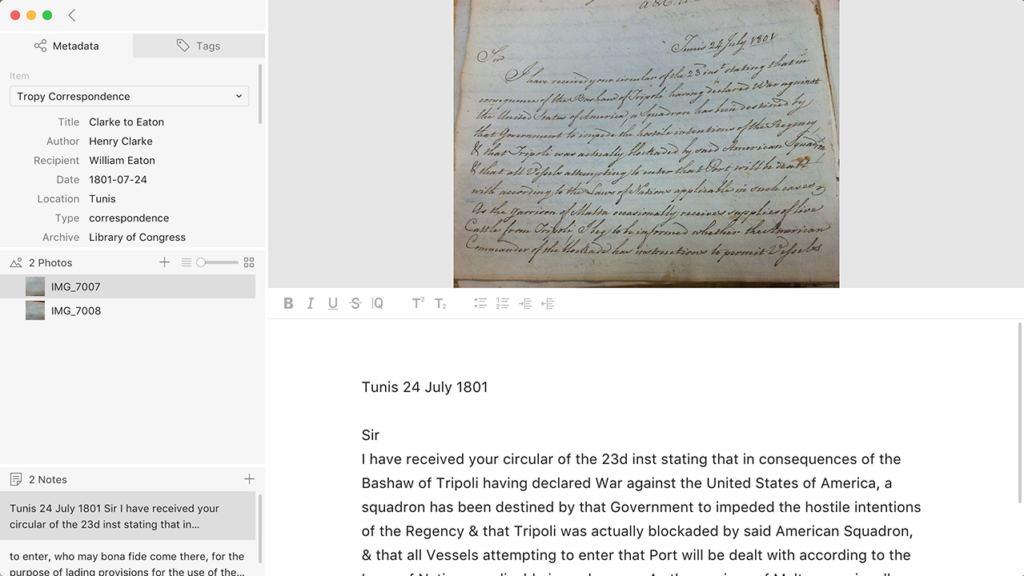
Source: Tropy. https://docs.tropy.org/in-the-item-view/item-view-basics
Submit your completed project by posting a link to your public blog post in the #week-05-tropy channel on Slack.