Due Monday April 1st
Nowadays, there are podcasts on almost every subject you can think of. This is partly because of the popularity of podcasts and partly because of how easy and inexpensively they can be made. Anyone can make a podcast, including you! There are many history podcasts out there in the world, and for this project, you’ll be making a short podcast episode of your own based on your historical research subject.
Some History Podcast Series to Inspire You:
- DIG: A History Podcast
- Consolation Prize
- Ben Franklin’s World
- The Green Tunnel
- Sidedoor: A Podcast from the Smithsonian
- Tides of History
Part 1: Planning
Podcasting, like many of our other digital projects, begins with a pen and paper. As tempting as it may be to simply jump straight to recording yourself ad-libbing about your topic, a good podcast is a planned podcast. Here are some things to think about as you start working on your podcast:
- Choose a focus or an ‘episode’ to discuss in your podcast. For example, if you are studying a war, your podcast could be about a specific battle. If you’re studying a person or group, it could be about a particular event they took part in. Just like your timeline, your podcast should not be a general overview of your entire subject. Tell a story to keep your listeners engaged!
- Your podcast will need to be at least 5 minutes long and no longer than 7 minutes. You’ll need enough material to fill that time but not too much!
- Many podcasts include short music or other audio clips to enhance the experience, such as musical intros, transitions and outros. You do not need to include music, but you are most welcome to! There are a couple things to keep in mind with music, so if this appeals to you, make sure to read more on music below.
Part 1.5: Gather Your Supplies
In order to make a podcast, you will need a few things. All you will need is:
- A decent mic and headphones. This can be just your phone’s headphones with a mic, your computer’s microphone or a gaming headset, depending on what you have. If you are using your computer’s built-in microphone, make sure it can record you speaking well enough to be heard clearly. A microphone included on headphones or a stand-alone mic will almost always produce better quality audio. If you’re feeling particularly fancy, you can also check out George Mason’s audio equipment rental, but you are not required to for this project. You simply need some way to record audio.
- A good script. Every good podcast begins with a good script and a strong narrative structure. Do your best to make your podcast more interesting than simply listing off a sequence of events. Tell interesting anecdotes or side stories, give context, make an argument, or pick a character and follow them through the story. Feel free to get creative. You are not required to stay strictly on script, but you will need to include a transcript with your podcast and a script is a great place to start.
- Audacity. Audacity is an open-source audio recording and editing program that is free to download and easy to use. Download Audacity here.
Part 2: Create Your Podcast
Once you’ve written your script and gotten your supplies together, it’s time to create your podcast! This will require both recording and editing. We talked in class about the basics of using Audacity, but in case you need a refresher or a more in-depth exploration, check out the video tutorials below or Audacity’s own documentation, which has many tutorials for all of its many, many functions. You won’t need most of them for this project, but feel free to have fun and play with them.
If you want to include music…
Music spices up any podcast, so I encourage you to use music in your project! However, you may not use any music that is copyrighted. This includes pretty much every song you listen to on a regular basis or can sing along to. You may ONLY use public domain music and sound effects.
A great place to find royalty-free, public domain music is the Free Music Archive; for royalty-free, public domain sound effects, check out FreeSound. However, every piece on these websites has individual rights associated with it. Since you are using them for non-commercial use, you will likely be fine with whatever you choose, but make sure to check the individual song or sound’s listing to see if they ask for attribution (aka mentioning the song or artist’s name somewhere in your credits).
Part 3: Embedding Your Podcast on Your Website
Once you have finished your podcast, it’s time to export it and upload it to your website for everyone to hear!
- Go to “File” and then “Export Audio.” Export your audio file as either a WAV or MP3 file.
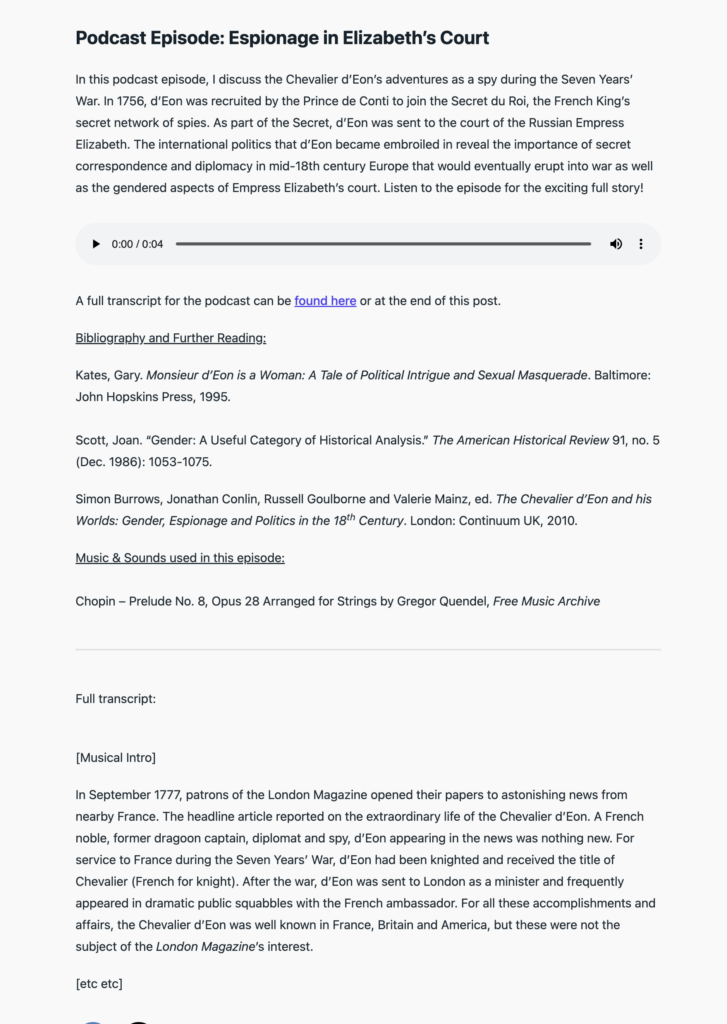
- Go to your blog and create a new blog post. In your blog post, be sure to include:
– A title for your podcast episode
– A short summary of your podcast that introduces the subject, explains why your chosen focus is important and entices listeners to listen
– The audio file (see below for how to embed it)
– Any sources or credits you need to include, including any sources you reference in your podcast and/or music and sound effects that require attribution
– A full transcript of your episode, either as a link to a Google Doc (make sure it’s set to be viewed by anyone with the link) or by including the full text at the end of your post - Publish your post!
To embed your completed audio file:
- In your blog post, click on the + icon to the side of where you usually type your text. You can also find the + in the top left corner of the screen. (This is the same way you embedded your timeline for the last project.) Select “Audio”. You may have to click “Browse all” in order to find it.
- Upload your audio file. Make sure you have saved your file as either an WAV or MP3 file. Do not upload your Audacity project file.
Here is an example of what your blog post should look like:
Submit your completed project by posting a link to your public blog post in the #week-10-podcast channel on Slack.